
This is Part 2 of a three-part series. Part 1: Nobody Wants to Use Your Software (And That’s the Point) explored why 80% of enterprise UI is disappearing. Part 3: The End of the Workflow covers what replaces it.
Here’s the thing most AI evangelists skip over: nobody’s handing the keys to an agent tomorrow. Especially not in accounting.
The people who run finance teams, controllers, CFOs, staff accountants, are trained to verify everything. That’s not a quirk. It’s the job. Financial integrity means catching silent errors before they cascade into misstated reports, failed audits, or worse. These are people who reconcile to the penny and feel uneasy when they can’t explain a variance.
Telling them “the AI handles it now” isn’t reassuring. It’s terrifying.
The biggest constraint to agent-driven software isn’t technical. It’s trust. And trust doesn’t show up because your model got 2% more accurate on a benchmark. Trust is an engineering problem. You have to build it into the system deliberately, layer by layer.
Accuracy isn’t enough. Transparency is.
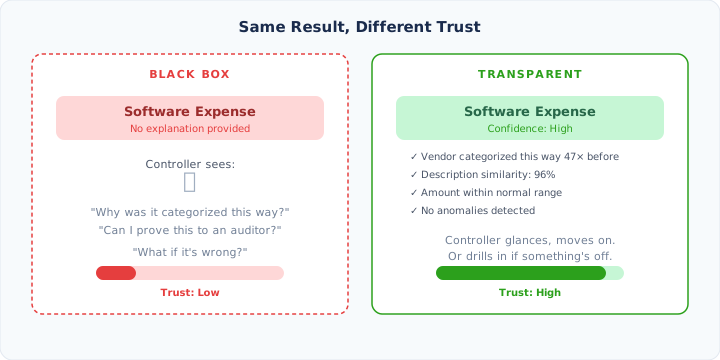
Let’s say your agent categorizes an invoice as “Software Expense” and gets it right 98% of the time. Sounds great. But what does the controller see? A line item that says “Software Expense” with no explanation of how it got there.
That’s not trustworthy. That’s a black box.
Now imagine the same result, but the system shows:
Categorized as Software Expense
- This vendor was categorized this way 47 times previously
- Description matches historical pattern (96% similarity)
- Amount is within the normal range for this vendor
- Confidence: High
Same outcome, completely different experience. The controller can glance at the reasoning and move on. Or dig deeper if something looks off. The key is that the option to verify exists, and the reasoning is legible.
Call it transparency over accuracy. A system that’s 95% accurate and fully explainable will earn trust faster than one that’s 99% accurate and opaque. Because in accounting, the question is never just “was this right?” It’s “can I prove it was right when the auditor asks?”
Every autonomous action needs to expose what happened, why it happened, what evidence was used, and what alternatives were considered. Not buried in a log file somewhere. Right there, on demand, in plain language.
The audit trail becomes the product
This connects to something fundamental about how accounting works. Every transaction has a paper trail. Every decision has a justification. Auditors don’t just check that the numbers add up. They check that you can reconstruct how you got there.
When an agent is making hundreds of decisions a day, the audit trail isn’t a nice-to-have. It IS the product. Every action needs to answer four questions: When it happened, Who did it, What they did, and most importantly, Why.
The Why is what carries the context. It’s the difference between “GL code 5100 was applied” and “GL code 5100 was applied because the last 14 invoices from this vendor were coded the same way, and the line items match the existing pattern.” That’s explainable. That’s verifiable. And if something looks off, a human can spot it and take action.
A real trail looks like this:
| When | Who | What | Why |
|---|---|---|---|
| 2:14 PM | Agent | Received invoice #4821 from Acme Corp | Ingested from AP inbox, matched to existing vendor (99% confidence) |
| 2:14 PM | Agent | Extracted vendor, amount, line items | OCR + LLM extraction, cross-referenced against vendor master |
| 2:15 PM | Agent | Applied GL code 5100 | Last 14 invoices from this vendor coded identically, line items match historical pattern |
| 2:15 PM | Agent | Routed to Controller for approval | Company policy: invoices over $10,000 require human sign-off |
| 3:02 PM | Controller (Sarah M.) | Approved invoice | Manual review, no exceptions flagged |
| 3:02 PM | Agent | Scheduled payment for net-30 terms | Vendor payment terms on file, due date March 27 |
That’s audit-grade traceability. Every step reconstructible. Every decision attributable. This is what lets a company tell their auditor “yes, agents processed 90% of our invoices, and here’s exactly how each one was handled.”
Without this, agent automation in accounting is dead on arrival. With it, you’ve actually made the audit easier than when humans were doing the work manually. Humans don’t leave this kind of trail naturally. They just… do things. The agent documents everything by default.
Trust isn’t binary. It’s a dial.
Here’s where most automation tools get it wrong. They give you two modes: on or off. Automated or manual. That’s not how trust works in the real world.
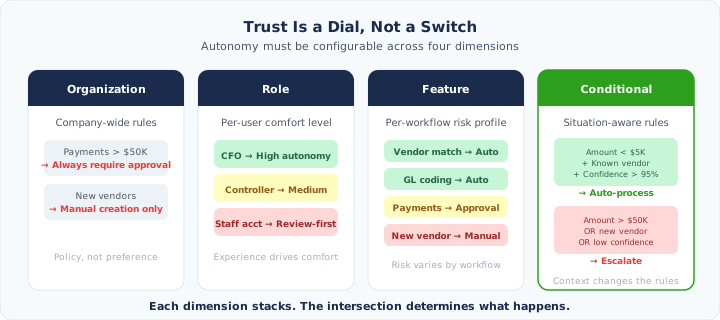
Trust is multidimensional. It varies by:
Organization level. Company policy says payments over a threshold need human approval. That’s a rule, not a preference.
Role level. A CFO doesn’t review every invoice line item. Not because they’re careless, but because that’s not their job. They trust their team to handle the details and focus on the big picture. A staff accountant who just started? They’re checking everything because they’re still building judgment for what “normal” looks like. The system should reflect those existing patterns. Show the CFO a summary. Show the junior accountant the detail.
Feature level. Vendor matching runs fully autonomous. Payment scheduling requires approval. New vendor creation stays manual. Different workflows carry different risk profiles, and the autonomy settings should reflect that.
Conditional level. This is where it gets interesting. Autonomy that adjusts based on the situation:
- Amount under $5,000, known vendor, confidence above 95%? Process automatically.
- Amount over $50,000, new vendor, or low confidence? Escalate.
The system should let you dial in exactly where you want the line for every combination. Not because users love configuring settings, but because configurable autonomy is what makes the jump from “neat demo” to “production system I trust with real money.”
You don’t go from zero to autonomous overnight
Even with full transparency and granular controls, you can’t drop an agent into a finance team and flip it to autonomous mode. People need to see it work.
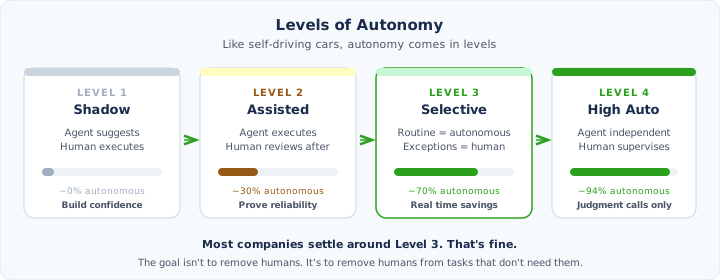
The adoption path looks more like four levels:
Level 1: Shadow mode. The agent watches, learns, and suggests. It says “I would have categorized this as Software Expense.” The human does the actual work. Purpose: build confidence that the agent understands the business.
Level 2: Assisted execution. The agent does the work, but everything goes through human review before it sticks. Think of it like a junior employee whose work gets checked. Purpose: demonstrate reliability at scale.
Level 3: Selective autonomy. Routine, high-confidence actions happen automatically. Exceptions and edge cases still surface for human review. This is where the real time savings kick in. Purpose: shift the human from operator to supervisor.
Level 4: High autonomy. The agent operates independently on almost everything. The human monitors system health, reviews the exception queue, and steps in for genuinely novel situations. Purpose: the human focuses exclusively on judgment calls.
Most companies will hover around Level 3 for a long time, and that’s fine. The goal isn’t to remove humans from accounting. It’s to remove humans from the parts of accounting that don’t require human judgment.
The key insight is that each level naturally builds on the last. By the time you’re in Level 3, you’ve watched the agent make thousands of correct decisions. You’ve checked its reasoning. You’ve seen it handle edge cases. Trust wasn’t declared. It was earned.
The interface reflects the trust level
This brings us back to the UI question from Part 1. If most of the workflow happens autonomously, what does the human actually look at?
The answer depends on where you are in the trust journey.
In Level 1, the interface is dense. You’re seeing everything the agent does, side by side with what you would have done. It’s an evaluation tool.
By Level 3, the interface is sparse. You see an activity feed (“Agent processed 42 invoices today”), an exception queue (“3 items need your attention”), and a confidence dashboard (“94% autonomous this week, 6% escalated”). The 42 invoices that went smoothly? They don’t need a screen. They happened. You can drill into any of them if you want, but you probably won’t.
The UI didn’t shrink because we removed features. It shrank because the user’s role changed. You went from executing workflows to supervising execution. That requires a fundamentally different interface, one designed not to let you control the machine, but to let you trust it.
Think of it as the shift from a control surface to a trust surface. Today’s enterprise software is a cockpit full of buttons because the human is flying the plane. Tomorrow’s is a monitoring station, because the plane mostly flies itself, and you’re there for the moments when it can’t.
What this means for building software
If you’re building enterprise tools today, especially in finance, the temptation is to bolt an AI layer onto your existing workflow UI. Add a “suggest” button. Drop in a copilot sidebar. Throw some ✨sparkles✨ on it. Ship it and call it AI-native.
That misses the point. Agent-driven software doesn’t need a better workflow UI. It needs a trust UI. Transparency panels. Confidence scores. Granular autonomy controls. Progressive adoption modes. Audit trails that satisfy both the user and their auditor.
This is hard to retrofit. The architecture is different. The data model is different. The UX paradigm is different. You’re not building screens for humans to execute tasks. You’re building screens for humans to understand and supervise task execution.
Part 3 will get into what this actually looks like in practice: the new interaction model, the four UI surfaces that replace today’s dashboards, and why the old “navigate to a screen and fill out a form” pattern is fundamentally incompatible with where enterprise software is heading.
Part 1: Nobody Wants to Use Your Software (And That’s the Point) · Part 2: From Control Surface to Trust Surface · Part 3: The End of the Workflow
Built for the future of finance
Proper is an AI-native platform for AP, AR, FP&A, payroll, and accounting — one system where humans only step in when it matters.