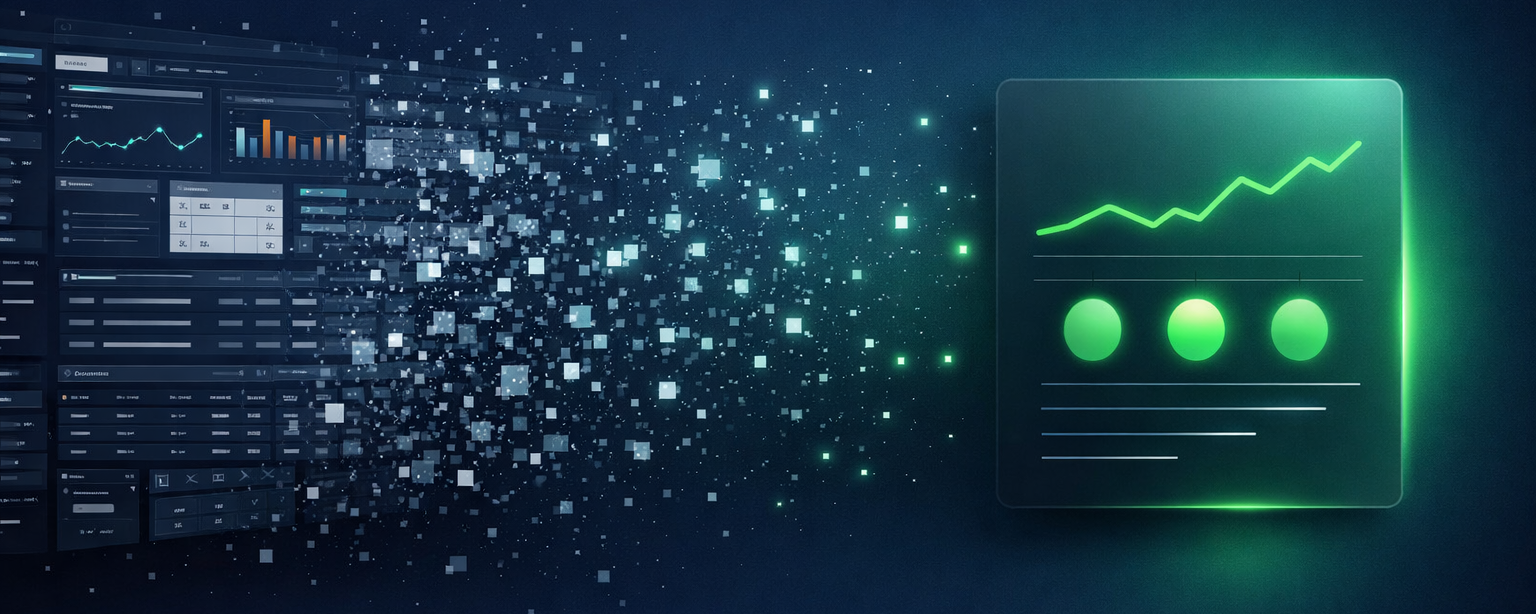
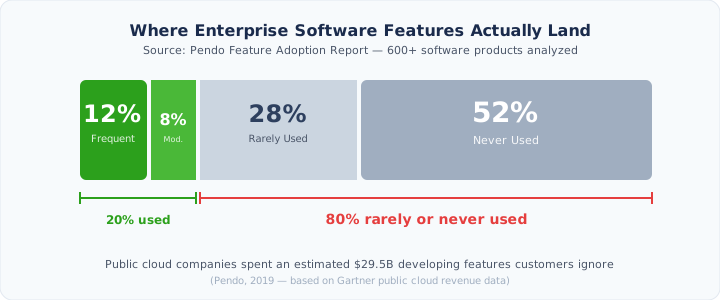
Here’s an uncomfortable number: 80% of features in the average enterprise application are rarely or never used.
That’s not a guess. Pendo analyzed over 600 software products and found that just 12% of features drive 80% of daily usage. The rest? Shelf-ware. Public cloud companies spent an estimated $29.5 billion building functionality their customers essentially ignore.
And honestly, can you blame them?
Think about a project manager in construction who bought accounting software to track costs and pay bills. He learned the 15% he needed on day one and never went deeper. He’s not sitting through a webinar about the new three-way matching feature that shipped last quarter. He doesn’t read release notes. He has a job site to run. The software could save him ten hours a week, but the interface demands he become a power user first, and he was never going to do that.
This isn’t a training problem. It’s a design problem. We’ve been building software for an audience that doesn’t have the time, patience, or motivation to fully learn it. And we’ve been doing this for decades.
The user is changing
Every enterprise interface you use today - the menus, dashboards, configuration screens, nested settings - exists because humans needed a way to tell machines what to do. We click through forms because machines can’t read our minds.
AI agents don’t need any of that.
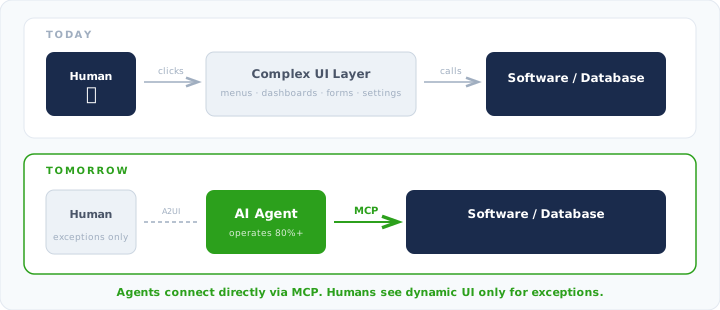
An agent processing invoices doesn’t need a beautiful AP dashboard. It needs an API. An agent reconciling bank transactions doesn’t need filters and search bars. It needs structured access to the data. The entire visual layer of enterprise software was a translation mechanism between human intent and machine execution. Agents skip the translation.
The connective tissue is already here. MCP (Model Context Protocol) is quickly becoming the standard way AI agents plug into tools, databases, and services. Instead of navigating a UI to pull a report or update a record, an agent connects via MCP and operates directly on the underlying system. No clicks. No screens. No misunderstood dropdown menus. Think of it as USB-C for AI: one protocol, universal access to any tool that supports it.
So if agents are the primary operators of enterprise software, the question stops being “how do we make this interface intuitive?” and becomes “why does this interface exist at all?”
What’s left for humans
Not nothing. But a lot less than today.
We think enterprise UI surface area shrinks to about 20% of what it is now. That 20% isn’t there for routine work. It’s there for the stuff AI can’t reliably do yet, or the decisions we simply don’t want happening without a human in the loop. An invoice that doesn’t match any purchase order. A contract clause that needs legal eyes. A budget variance that feels wrong even though the numbers technically work. Approving a $2M vendor payment.
The human becomes the decision-maker and exception handler, not the operator.
Interfaces that come to you
The UI that remains won’t look like what we have today. Static dashboards with forty tabs don’t make sense when 80% of the time, you only need to see one thing.
Future interfaces will be dynamic, generated on demand, shaped by the task at hand. You’re seeing early versions of this already. Claude Code doesn’t give you a menu. It asks follow-up questions. The interface emerges from the conversation, showing only what’s relevant.
Google’s A2UI (Agent-to-User Interface) protocol pushes this much further. It’s an open standard that lets agents generate full interactive UI components on the fly: forms, charts, maps, approval screens. These render natively on web, mobile, or desktop using each platform’s own widgets. The agent decides what the human needs to see, builds it in real time, and presents only the relevant slice.
No navigating to the right screen. No hunting through menus. No onboarding that tries to teach you 100% of a tool when you’ll use 12%.
The interface finds you when it needs you.
The feature discovery problem dies
This shift also kills one of enterprise software’s most stubborn problems. Today, vendors ship features that most users never find out about. Release notes go unread. Tooltips get dismissed. The gap between what the product can do and what the user knows it can do widens with every update.
Agents don’t have this problem. They don’t skip onboarding. They don’t miss changelogs. When a new API endpoint ships, every connected agent has access to it immediately. Full capability adoption, day one.
The human doesn’t need to discover features. The agent already has.
So what now?
If you’re buying enterprise software, start asking vendors hard questions about agent access. MCP support, API coverage, headless operation. The tools that will serve you best in two years aren’t the ones with the prettiest dashboards. They’re the ones that work when nobody’s looking at a screen.
If you’re building enterprise software, the math is brutal. You can keep investing in UI that 80% of users will ignore, or you can build for the agents that will actually use your full feature set. The winners of the next decade won’t be the platforms with the most intuitive human interfaces. They’ll be the ones agents can operate end to end, with a thin, smart UI layer for the moments when a human needs to step in.
$29.5 billion on features nobody uses. That wasn’t just waste. That was the market telling us, for years, that humans don’t want to operate complex software.
We just didn’t have an alternative until now.
This is Part 1 of a three-part series. Part 2: From Control Surface to Trust Surface explores why trust, not capability, is the real barrier to agent-driven software. Part 3: The End of the Workflow covers what replaces today’s interface.
Built for the future of finance
Proper is an AI-native platform for AP, AR, FP&A, payroll, and accounting — one system where humans only step in when it matters.