
This is Part 3 of a three-part series. Part 1: Nobody Wants to Use Your Software explored why 80% of enterprise UI is disappearing. Part 2: From Control Surface to Trust Surface covered the trust problem.
So what actually replaces today’s interface?
Most of the work doesn’t need AI
Before we get to the future, a clarification that most AI discourse skips entirely. The majority of accounting workflows don’t require LLMs at all.
Matching an invoice to a purchase order? That’s fuzzy matching on a few fields. Routing an approval based on amount thresholds and department? That’s a rules engine. Reconciling bank transactions against recorded entries? Pattern matching with known tolerances. Validating that required fields are present before submission? A checklist.
These are deterministic problems. They have clear inputs, clear rules, and predictable outputs. Most accounting software already handles some version of these today, but usually at a basic level: simple matching, straightforward approval routing, elementary bank rules. The fundamentals exist. They’re just not very good yet.
LLMs are inherently non-deterministic. You do not want a language model deciding whether an invoice matches a purchase order. That’s a structured comparison with a correct answer. You want traditional logic for that, logic that gives you the same result every time. Throwing an LLM at deterministic work is like hiring a creative writer to do arithmetic. It’ll sometimes get it right, but you definitely can’t trust it at scale.
Maybe 70-80% of accounting workflow automation is this kind of traditional logic, reliably handling structured, predictable processes. AI is the remaining 20-30%, and THAT is what actually matters for unlocking the next level.
Where AI changes the game
AI becomes valuable in three specific areas where deterministic rules break down.
Intent interpretation. A CFO says “keep cash healthy this month.” That’s not a rule you can hard-code. It requires understanding the company’s cash position, payment obligations, vendor relationships, and priorities, then translating a vague human goal into concrete actions: delay non-critical payments, prioritize vendors with early-pay discounts, adjust the payment schedule to smooth out cash flow. That’s reasoning, not rule execution.
Unstructured document understanding. An invoice arrives as a PDF with a non-standard layout. The line items don’t map cleanly to your chart of accounts. There’s a handwritten note saying “per our conversation, adjusted rate applies.” A rules engine sees fields and values. An LLM agent reads the document the way a human would, understanding that “adjusted rate” probably refers to the contract amendment from last quarter, flagging it for review with that context attached. Or a vendor sends a credit memo buried inside a multi-page statement. Traditional OCR extracts text. An agent understands what the text means and how it relates to open invoices.
Planning and optimization. When you have competing priorities (minimize late fees vs. maximize cash position vs. maintain vendor relationships), the tradeoffs aren’t always obvious. An agent can model options: “Pay this batch now and save $2,400 in late fees, or defer two weeks and keep an extra $180,000 in the account through month-end.” That’s not automation. That’s analysis your team is probably doing in spreadsheets today!
The interaction model flips
Here’s where the interface really changes.
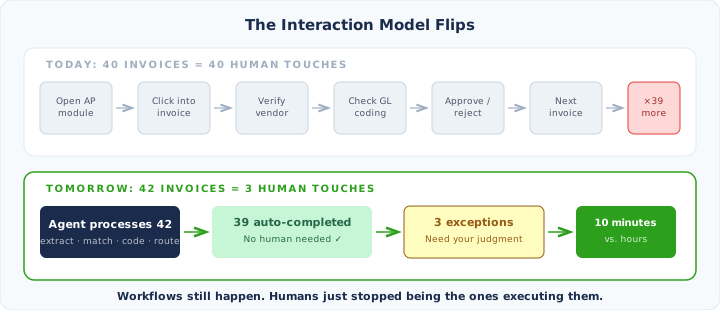
Today, processing invoices looks something like: open the AP module, navigate to the invoice queue, click into each invoice, verify the vendor match, check the GL coding, approve or reject, move to the next one. Repeat forty times. Every step is a human touching a screen.
In the new model, the interaction looks like: “Pay vendors normally this week.” Or even nothing at all, because the agent already knows the policy and just runs it.
The agent internally does everything: receives invoices, extracts data, matches vendors, applies coding, checks approval thresholds, schedules payments. The human sees a summary:
42 invoices processed. 39 completed automatically. 3 exceptions need your attention.
That’s it. That’s the daily AP workflow. Three exceptions to review instead of forty invoices to touch. The workflows still happen. Every step still executes. But the human stopped being the one executing them.
This is the key insight that keeps getting lost in the AI conversation: agents don’t eliminate workflows. They eliminate the need for humans to execute workflows. The work still gets done. The human just isn’t the one doing it anymore.
Four surfaces replace the dashboard
So what does the screen actually look like? The dense, tab-heavy enterprise dashboard gets replaced by four focused surfaces.
Goals. This is where the human sets intent. Maintain minimum $500K cash balance. Don’t let any payment go past net-30 terms. Close the books within two business days of month-end. These aren’t one-time settings. They’re living parameters the agent optimizes against. Change a goal, and the agent adjusts its behavior.
Activity feed. A running log of what the agent is doing. Processed 42 invoices. Categorized 18 expenses. Detected 2 anomalies. Scheduled $34K in payments. This isn’t a dashboard you stare at. It’s a feed you glance at, the way you glance at your phone’s notification center. If everything looks normal, you move on, but you also have the option to look at their details.
Exception queue. This is the primary daily interaction. The things the agent couldn’t handle confidently, or the decisions that policy requires a human to make. Three items need your attention. You review them, make judgment calls, and move on. This surface replaces what used to be hours of routine processing. Now it’s ten minutes of actual decision-making.
System health. How is the agent performing? Confidence level: high. Autonomous actions this week: 94%. Escalations: 6%. Processing time down 40% from last month. This is the supervisory view. You check it periodically, the way a manager checks team metrics. If the numbers look good, the system is healthy.
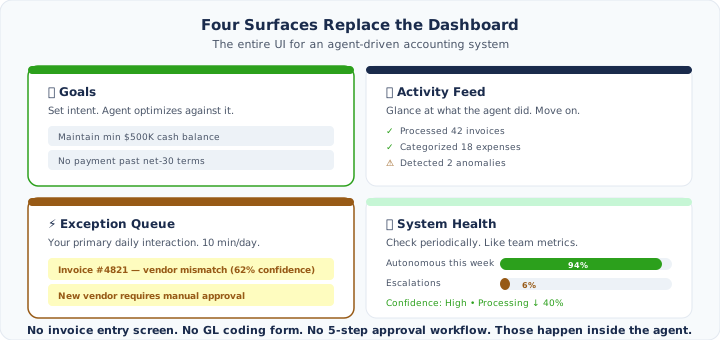
Notice what’s missing from this list by default: there’s no invoice entry screen front and center. No GL coding form. No approval workflow with five steps. No bank reconciliation interface. Those screens still exist. If a controller wants to manually enter an invoice, review every GL code, or walk through a reconciliation line by line, they absolutely can. But those aren’t the primary interaction anymore. They’re there for the exception cases, the same way you can still manually override cruise control but you don’t do it for every mile of highway. The default experience is the four surfaces above. Everything else is available but not in your face.
Exception-first design
This is probably the biggest conceptual shift. Today’s software is designed around the happy path. The primary UI is built for normal operations: entering invoices, categorizing expenses, running reports. Exceptions are secondaries that compete for attention alongside everything else on the screen.
Agent-driven software flips this completely. Normal operations are invisible by default. They just happen. The entire UI is optimized for exceptions, because exceptions are the only thing that requires human involvement.
Think about it from a design perspective. If 94% of transactions process automatically, why would the default view show all transactions? That’s designing for the 94% that doesn’t need you. Instead, the default view shows the 6% that does. The exception queue becomes the center of the application. The full transaction list, the detailed ledger, the complete audit log, those are all still there. You can drill into them whenever you want. But they’re one click away, not the landing page. Everything in the default experience is built around the work that actually needs a human.
Legacy systems can’t bolt this on
This is where it gets uncomfortable for the incumbent players. The architecture behind traditional accounting software is built around a human execution model. Every feature assumes a human is driving: navigating pages, filling forms, clicking buttons. The data model is organized around these workflows. The API is an afterthought (if it exists at all).
You can’t take that foundation and add an “AI agent” that just automates the clicks. That’s RPA with a language model, and it inherits all the fragility of the underlying UI-driven architecture. When the UI changes, the automation breaks. When a new edge case appears, there’s no reasoning layer to handle it.
AI-native systems need to be built differently from the ground up. The execution layer is designed for agents, not humans. The data model supports confidence scores, decision reasoning, and audit metadata as first-class concepts. The API isn’t bolted on. It’s the primary interface. The human UI is a thin layer on top, purpose-built for supervision.
This is the same pattern we’ve seen in every major platform shift. Mobile didn’t succeed by shrinking desktop interfaces onto small screens. The companies that won built for mobile from scratch. Cloud didn’t succeed by hosting on-prem software in data centers. It required rethinking multi-tenancy, scalability, and deployment from the ground up.
The same thing is happening now. The companies that try to add AI to their existing workflow-driven architecture will ship impressive demos. But the companies that build for the intent-driven, exception-first model from day one will ship products that actually change how work gets done.
The protocols are already here
This shift isn’t theoretical. New protocols are already taking shape that map directly to the model we’ve been describing.
WebMCP (Web Model Context Protocol), developed by Google and Microsoft through the W3C, lets websites expose structured, callable tools directly to AI agents through the browser. Instead of an agent scraping HTML and guessing where buttons are, the site tells the agent exactly what actions are available. One structured tool call replaces what used to be dozens of fragile screen-scraping interactions. This is the agent-to-system layer, the plumbing that lets agents execute workflows without pretending to be humans clicking through forms.
A2UI (Agent-to-User Interface), also from Google, works the other direction. It gives agents a declarative format to describe UI components (cards, buttons, approval forms) and the client renders them natively. No pre-built dashboards required. When your agent surfaces three exceptions that need attention, it doesn’t need a static screen waiting for that moment. It declares what it wants to show you, and the interface assembles on demand.
Whether these specific protocols become the standard remains to be seen. But the direction is clear. WebMCP is how agents talk to systems. A2UI is how agents talk to humans. The old model was: human → interface → system. The new model is: human ← agent → system. The human moves from the driver’s seat to the receiving end. And if companies like Google and Microsoft are standardizing this at the browser level, building around the “navigate to a screen and fill out a form” pattern isn’t just a design choice. It’s building against the direction of the platform.
The formula
Reduce all three posts in this series to a single diagram and it looks like this:
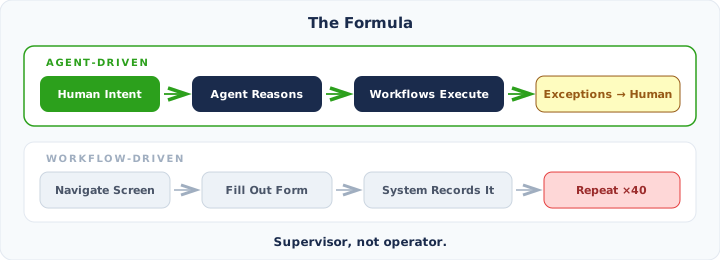
The first model treats the human as a supervisor. The second treats the human as a data entry clerk with a nice UI. We’ve been building the second one for thirty years. It’s time to build the first.
If you enjoyed this series, or if you think I’m wrong about any of it, I’d love to hear from you. Find me on X/Twitter.
Part 1: Nobody Wants to Use Your Software (And That’s the Point) · Part 2: From Control Surface to Trust Surface · Part 3: The End of the Workflow
Built for the future of finance
Proper is an AI-native platform for AP, AR, FP&A, payroll, and accounting — one system where humans only step in when it matters.